
Tools
The app is a directory with a floor plan attached. The paper map at the gate is a floor plan with nothing attached, and on the floor that is often the faster tool.
Contents
The official app is an exhibitor directory with the fair's floor plan attached. It lets you search companies by product or name, find a booth number, look up which hall holds a category, and check the schedule for the phase you are attending.
It also carries buyer-side functions: the badge record, fair notices, and in most sessions some form of sourcing or matchmaking feature that pairs a buyer's requirements with exhibitors who have registered interest in that category.
Menus and features are revised between sessions, and the English interface sometimes lags the Chinese one. Expect to spend twenty minutes working out where things are, and do that before you fly rather than in a corridor.
The app's best hour is the one you spend with it at home, before the fair. Search your category, export the exhibitor list, and build the shortlist that the two-day plan depends on.
Search by hall as well as by product. Knowing that your fifteen candidates sit in four halls changes the schedule more than knowing their names, because the walk between areas is the fixed cost of the day.
Save the booth numbers somewhere that works offline: a note, a spreadsheet, a screenshot. Signal inside the halls is usable but uneven, and a list that needs a live connection is a list that fails at the moment you are standing in front of the stand.
Search in the language the directory uses, which is English, and search by the product noun a factory would put on its own sign rather than the phrase your customers use. A supplier of insulated cups lists them as vacuum flasks; a search for drinkware returns the traders who resell them.
Take the exhibitor count per hall seriously. A category spread across eight halls is a category where the fair is showing you the whole supply base, and one hall means the industry is concentrated. That number should decide how many days the category deserves.
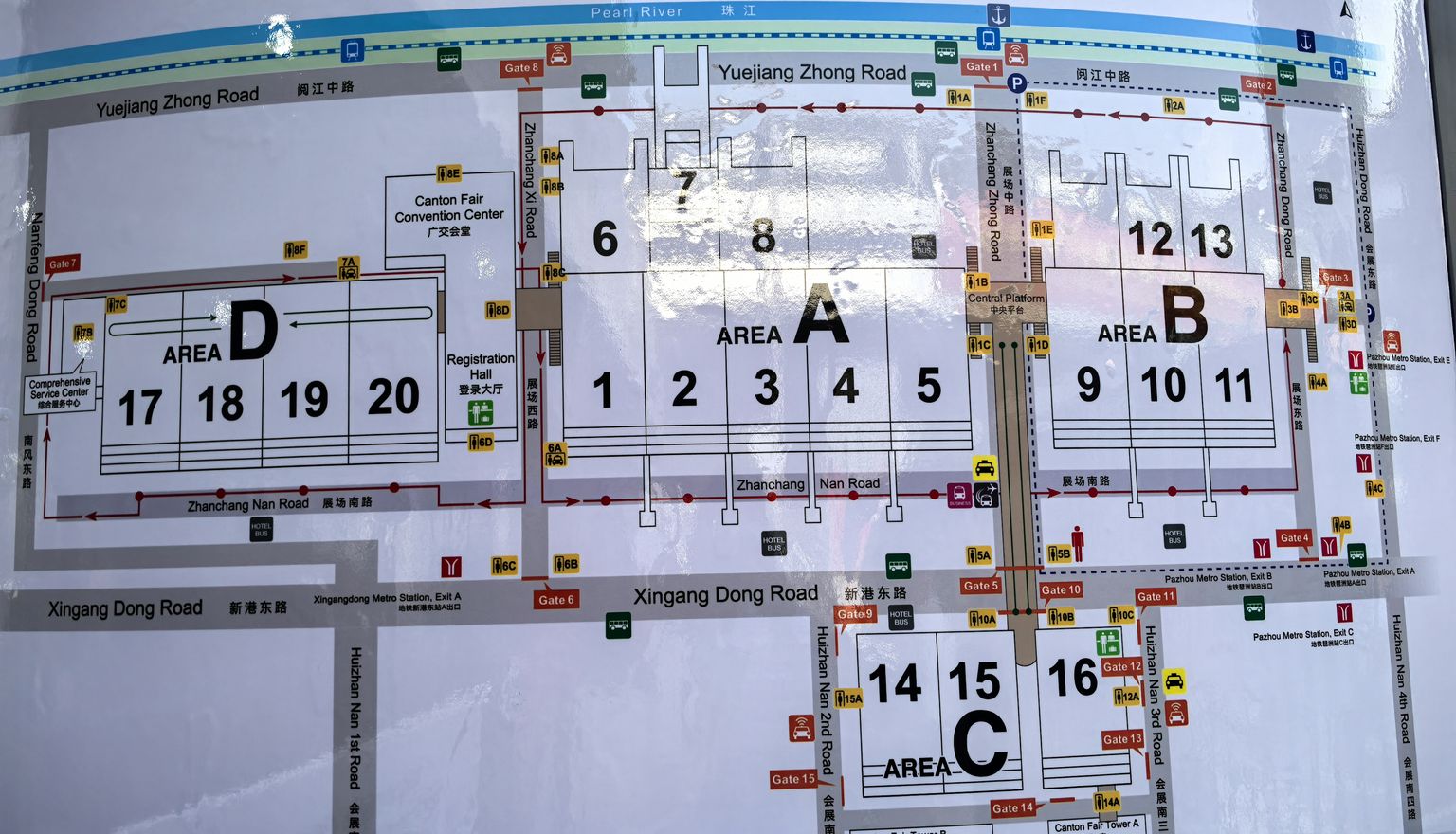
The printed map handed out at the gates shows the whole complex on one sheet: Areas A to D, halls 1 to 20, gates 1 to 16 and the metro stations at each corner. It answers a navigation question in about five seconds.
The app answers the same question in five taps, after a login, with a zoom gesture. On a concrete floor with ten thousand people walking, the fold-out sheet wins.
Take one at the gate on day one. Mark it up: circle the booths you have visited, cross out the ones that failed, write the shortlist numbers in the margin. By the afternoon it is a better record of your day than any app screen.
The numbering is worth understanding before you use either tool. Areas are lettered A to D, halls are numbered 1 to 20 within them, and gates 1 to 16 sit on the outside ring. A booth reference combines the two: hall first, then stand. Once that is in your head, a directory entry becomes a route, and a route becomes a decision about whether the detour is worth it.
Booths on a main aisle get more traffic and charge more for the location through their prices. Booths at the end of a row in a side aisle see fewer people and often quote lower. Both are in the same hall numbers, which is why the paper map with your own pen marks on it beats a search result.
After the fair, quotations arrive on WeChat, not by email. Chinese suppliers send price lists as images, specifications as PDFs, and follow-ups as voice messages, and a buyer who insists on email will receive answers three days late and half as complete.
Install it, verify with your own number, and add every supplier at the booth. Send a message from each one while you are standing there so the contact is live and the name is searchable.
Use the chat as your record: photograph the booth sign into the chat, send your own summary of what was agreed, and ask for confirmation in writing. A supplier who confirms terms in a message has given you something an email would not have produced.
Group chats are where the actual coordination happens once an order is running. A factory will create one with the salesperson, the production planner and often the person who books the containers. Being in that group shortens every question, and it also shows you how the company talks to itself.
Keep the messages. WeChat history is searchable and it is dated, which makes it better evidence of what was agreed than a verbal recollection three months later.
Two translation tools are worth having: one that translates text on a photo, and one that handles speech. Download the offline language pack before you fly, because the halls are exactly the kind of place where a download stalls.
Camera translation is the useful one. Product labels, carton markings, a menu, a specification sheet in Chinese: photograph, read, move on. It is not accurate enough for a contract and it is accurate enough for a carton.
Speech translation is less reliable at a noisy booth and should not be trusted with numbers. For anything commercial, write it down.
A phone that runs the directory, the camera, the payments and the WeChat messages will not last from 09:30 to 18:00. Carry a power bank, and check the airline rules for it before you pack: spare lithium batteries travel in the cabin, not in checked baggage, with capacity limits that vary by carrier.
Charging points inside the halls are scarce and contested. A 10,000 mAh bank is enough for one full recharge, which is usually enough to get to the hotel.
Signal is workable in the concourses and weaker deep inside a hall. Anything that must be downloaded, download it at breakfast.
The directory tells you a company exists and where it stands. It says nothing about whether the factory can hold a date in December, whether the export documents are done in-house, or whether the last shipment was rejected at destination.
Those answers come from three places: the booth conversation, the factory visit, and a reference customer who has shipped from them before. Two of the three are outside the app, and the third requires you to ask.
The tools remove the navigation problem. The judgement problem is still yours, and it is the one that decides whether the container is right.
Q Is the Canton Fair app worth installing?
Yes, mainly for the exhibitor directory and booth lookup, and mainly before you travel. Export your shortlist and save it offline. Features and menus change between sessions, so allow twenty minutes to learn the current layout.
Q Does the app work offline?
Partly. Downloaded lists and screenshots survive, live search does not. Save booth numbers and company names in a note or a spreadsheet before you enter the halls.
Q Why use the paper map instead of the app?
Because it shows the whole complex at once: areas, halls, gates and metro access on one sheet. Looking something up takes seconds rather than taps, and it works with no battery and no signal.
Q Should I use WeChat or email to follow up with Chinese suppliers?
WeChat for the first weeks, email for anything that has to be filed. Suppliers send quotations, specifications and voice messages through WeChat, and replies arrive much faster there.
Q Which translation tool works best at the fair?
Camera translation for labels, menus and carton markings, with the offline language pack downloaded in advance. Avoid speech translation for anything involving numbers or commercial terms.
Q What should I carry for a full day in the halls?
A power bank within airline limits, a bottle of water, a few hundred yuan in cash, the paper map, and your shortlist saved offline. Everything else can be bought inside the complex.
Related pages
Once the shortlist is down to three suppliers, send us the products and carton details. We will price the shipment and tell you which one is cheapest once it lands.
Email sales8015@goodhopefreight.com | WhatsApp & phone +86 133 9216 2503